Create exact images of your hard drive and server and clone them

Backups are not the only resource you have left when you're hit by computer disasters. Disk images are an alternative choice.

Top Recommended Alternative
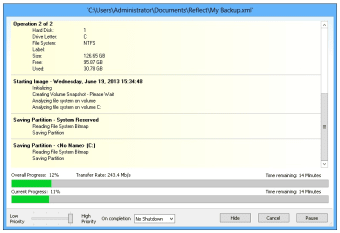
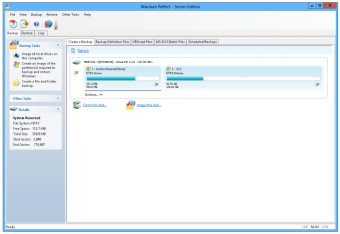
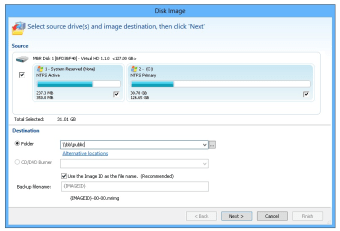
With Macrium Reflect you now have access to a free disk imaging solution (which is not that common, unfortunately) that enables you to create a perfect mirror image of your hard drive. This means that in case your computer suddenly "dies", you can always bring it back to life by restoring the disk image you previously created with Macrium Reflect.

Of course, disk images don't make sense if you store them on the same hard drive you're copying, so you'll need to use an extra storage device (external or not) or a networked drive to save your mirror image.

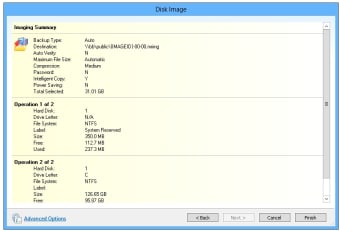
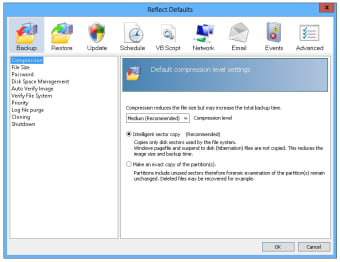
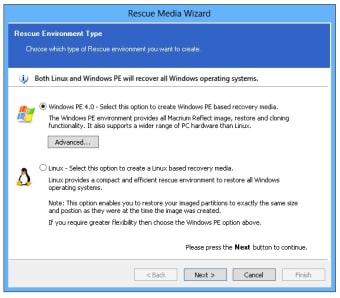
Macrium Reflect is very easy to use because it lets you create images via an assistant that guides you through the whole process in just a few simple steps. What doesn't seem that easy is the scheduled backup tool: it works with XML template files and novice users will surely find it confusing. Also, Macrium Reflect lets you create rescue disks, but unfortunately only for Linux, Windows XP and Windows Server 2003.

If you care about the safety of your documents, take a moment to create a mirror image of your hard drive with Macrium Reflect. It's very easy to use and can really save your life! If you are looking for alternatives, we recommend you to try Acronis True Image and EaseUS Disk Copy.

Changes

Unicode filename compatibility Windows PE Update Now compatible with Windows 7

  • Pros

    • Disk imaging made easy!
    • You can create a disk image in just a few steps
    • It's free
  • Cons

    • Scheduled backups are not very user-friendly
    • Rescue CD is limited to a few operating systems
 0/6

App specs

Program available in other languages


Icon of program: Macrium Reflect

Macrium Reflect for PC

  • Free
  • 3.9
    125
  • 98.6K
  • V8.0-20211107

User reviews about Macrium Reflect

3.9

4 reviews

Add review

Main reviews for you

  • Anonymous user

    Great backup for server and home drive. After checking on Reddit and reading the review here I decided to give it a try. It's free and you can use it for home and business, and with it you can clone and boot your failed drive. Pros: freehome usegood tutorial on their knowledgebaseworth getting the full key license Cons: hard to find for linux

  • Anonymous user

    No. 1 Backup software. Is no doubt no.1 Backup software. If you are looking for a windows software to backup and restore windows then Macrium Reflect is your best bet. Version 6 got even better Pros: RelaibleWin PE boot CDNow version 6 has Win PE pre boot menu Cons: Non till now

  • Anonymous user

    Macrium reflect free and windows 7 64 bit. What good is the backup if you can't create a rescue cd. I've looked all over the web for somebody who has successfully used the Linux rescue CD with Win 7 64 bit and can't find anyone. When Macrium is asked about this problem (in their forums) they respond that the Linux Rescue CD doesn't work with "some" hardware - buy the Macrium paid version. I'd like to know what this elusive, magical hardware is and has anybody ever found it. I have used Macrium Reflect very successfully (and easily) for a few years on Win XP 32 bit on 3 different machines - all with very different hardware. Strangely, Linux rescue CD never worked on any of those hardwares either - but BartPE easily did it. Pros: Easy to "create" - fast - reliable. Good help on their forums. Cons: Free version is useless to the Win 7 64 bit user unless he has the "magic" hardware.


  • Anonymous user

    Macrium reflect own experience very nice program that works !!!!. on windows xp I did around 250 restores all taking about 4 minutes never had had any errorsI start making a virgin pc all nice and clean with no errors and no virusses than make a master backup of thiswant to add something else afterwards such as photoshop make a new backup and give it a new namethis software has NO flaws only good things unlike many other softwares such as ghost which have many error messagesand it is cheap that I cannot understand why it is so cheap continue your good work nick of macrium and this man also has a very fast support by emailperfect product as far as I am concerned and 99.9% of pc users even companies Pros: all Cons: none

More

You may also like

Alternatives to Macrium Reflect

Explore Apps

Latest articles

Laws concerning the use of this software vary from country to country. We do not encourage or condone the use of this program if it is in violation of these laws.
Softonic

Is Macrium Reflect safe?

100/100

Score result: Clean

This file passed a comprehensive security scan using VirusTotal technology. It is safe to download.

  • Virus free
  • Spyware free
  • Malware free
  • Verified by Security Partners

    VirusTotal logo

Scan Info

Last scan
Saturday, October 8, 2022
Scan provider
VirusTotal · Full report

File Integrity

File
ReflectDLHT.exe
SHA256
73a33442dbbfe5129121e3b3333b33b0e0f21dc46a7feda403c61b605710de87
SHA1
b75679df9bf4e2ee56ba193fe75e5da990bf9fa5

Softonic security commitment

Macrium Reflect has been thoroughly scanned by our advanced security systems and verified by industry-leading partners. This file comes from the official developer and has passed all our security checks, showing no signs of viruses, malware, or spyware. For more information, visit our Security and Trust Center